Connecting BI tools via the Postgres wire surface¶
OrionBelt's Postgres wire surface (PGWIRE_ENABLED=true) lets any
Postgres-compatible client query a loaded OBSL model — without
installing a custom JDBC driver, ODBC bridge, or Arrow Flight client.
Most BI tools ship a built-in Postgres connector that "just works".
This page is a step-by-step manual checklist for the four tools covered by Step 5 of the Postgres wire plan: DBeaver, Tableau Desktop, Power BI Desktop, and Metabase.
The Semantic Loop — Dremio + OrionBelt¶
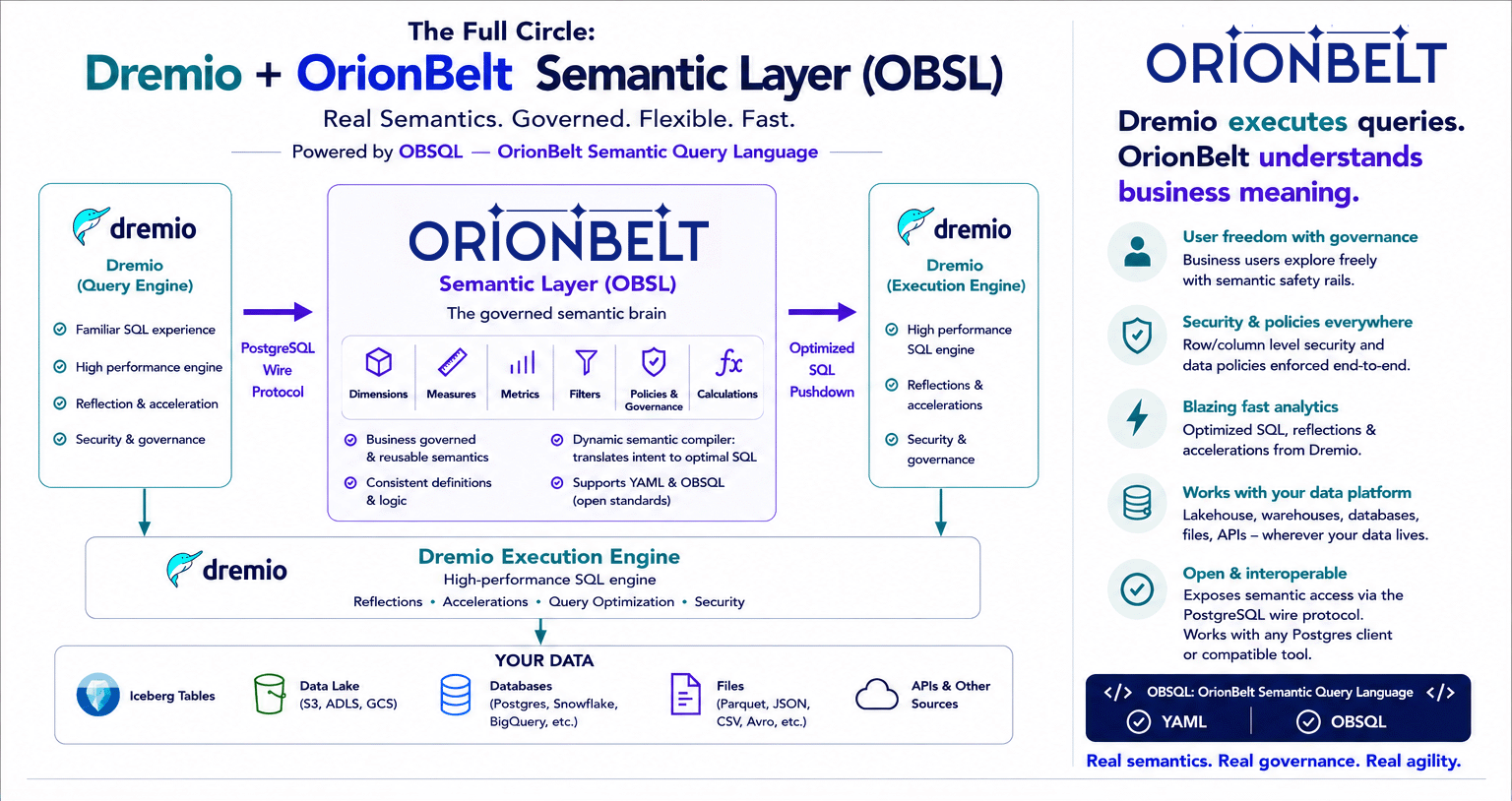
Dremio is the flagship pgwire consumer in v2.5: register OBSL as a
Postgres source, and Dremio's federation engine pushes queries down
over the wire. With a Dremio-backed OBSL model (OBML
settings.defaultDialect: dremio) the loop closes — Dremio
queries OBSL via Postgres, OBSL compiles to Dremio's SQL dialect,
ob-dremio's Arrow Flight driver streams the result back through
Dremio's own execution engine. Governed semantics, no extra hop.
TLS¶
The pgwire surface takes the same two settings the Flight one does, read by the same loader:
PGWIRE_ENABLED=true \
PGWIRE_TLS_CERT=/certs/server.crt \
PGWIRE_TLS_KEY=/certs/server.key \
uv run orionbelt-api
Postgres does not start encrypted. The client sends an SSLRequest, the server
answers S or N, and only then is the socket upgraded — so configuring a
certificate makes the server offer TLS rather than demand it, and
sslmode=disable still connects. That is the protocol's own semantics, not a
weakening.
Measured against libpq (psycopg 3):
sslmode |
Result |
|---|---|
disable |
connects in the clear |
prefer |
encrypted when a certificate is configured, plaintext when not |
require |
encrypted, certificate not checked |
verify-ca with sslrootcert |
encrypted, certificate chain checked |
verify-full |
as above, plus the hostname |
verify-ca with the wrong CA |
refused |
Both settings or neither, and the same non-root file-permission caveat applies
as for Flight — see Connecting via ADBC. A
misconfiguration stops startup rather than silently answering N to every
SSLRequest, which would leave clients in the clear against a configuration
that reads as encrypted.
1. Common configuration¶
Start the OBSL server with the wire surface enabled:
DB_VENDOR=duckdb \
DUCKDB_DATABASE=examples/orionbelt_1_commerce.duckdb \
QUERY_EXECUTE=true \
PGWIRE_ENABLED=true \
PGWIRE_PORT=5432 \
MODEL_FILES=examples/orionbelt_1_commerce.yaml \
uv run orionbelt-api
Every client uses the same connection details:
| Setting | Value |
|---|---|
| Host | the machine running orionbelt-api (localhost for local dev) |
| Port | PGWIRE_PORT (default 5432) |
| Database | the model addressing name — the OBML name: field or, lacking that, the file stem (e.g. orionbelt_1_commerce) |
| Username | any non-empty string (obsl, the tool's default — ignored in trust mode) |
| Password | leave empty in trust mode; with AUTH_MODE=api_key the API key is the password (SCRAM-SHA-256 by default) |
| TLS / SSL | disable unless the server was started with PGWIRE_TLS_CERT / PGWIRE_TLS_KEY - see TLS above |
To list available model names, query the REST GET /v1/models
endpoint or check the server startup log.
2. DBeaver¶
DBeaver Community speaks pgwire natively via its bundled PostgreSQL JDBC driver.
- New Connection → PostgreSQL. Fill in host, port, database
(the model name), username
obsl, no password. - Driver properties →
sslmode = disable. OBSL doesn't ship TLS; the defaultsslmode=preferwill silently fall back. - Test connection. DBeaver issues a flurry of pg_catalog probes immediately. Expect success.
- Schema browser → "main" schema → Tables. You should see one entry per loaded model. Right-click → "View data" returns rows.
-
SQL editor. Try:
| Behaviour | Expected |
|---|---|
| Schema tree populates | ✅ |
| Column types displayed correctly | ✅ (via information_schema.columns) |
| Bind-parameterised query (DBeaver "Generate SELECT * LIMIT 100") | ✅ (extended-query protocol, Step 4) |
\d-style metadata dialog |
⚠ partial — DBeaver may fall back to information_schema (works) |
3. Tableau Desktop¶
Tableau's PostgreSQL connector lives under Connect → To a Server → PostgreSQL.
- Enter the connection details from §1.
- Tableau may probe
pg_catalog.pg_classandinformation_schema.tablesat connect time — these are answered by the catalog emulator. Its temp-table connect check (create a"#..."table, insert, read back, drop) also runs there.
What the catalog emulator runs
Statements that are not semantic queries go to an in-memory catalog
with no access outside the process. It accepts one statement at a time:
a SELECT over pg_catalog, information_schema or a loaded model's
OBSL objects (model, dimensions, measures, metrics and their
_*_metadata views), or the "#..." temp-table cycle above. Anything
else is refused with SQLSTATE 42501 and CATALOG_QUERY_REJECTED. If a
BI tool's connect or browse step fails with that code, please report the
statement it sent.
- Once connected, drag the model table from the left panel onto the canvas to use it as a data source.
- Drag a dimension (e.g.
Sales Year) to Rows and a measure (e.g.Total Sales) to Columns. A bar chart renders.
| Behaviour | Expected |
|---|---|
| Connect succeeds | ✅ |
| Table list populates | ✅ |
| Live (non-extract) data refresh | ✅ |
| Custom SQL with parameters | ⚠ depends on the SQL — only SELECT dim, measure FROM model shapes round-trip |
4. Power BI Desktop (Windows only)¶
- Get Data → PostgreSQL database. Server:
host:port. Database: the model name. - Authentication: Database tab, leave password empty.
- After connecting, the Navigator shows the model table. Tick it and load.
- Build a visual — drag the dimension and measure onto a chart.
Power BI defaults to Import mode. DirectQuery will run live queries through pgwire on every interaction — works, but every chart becomes a network round-trip.
5. Metabase¶
Self-hosted Metabase ships a Postgres connector.
- Admin → Databases → Add database → PostgreSQL.
- Fill in the connection details from §1. Leave SSL disabled.
- Metabase scans
information_schemaat connect time to populate the "Data Reference" panel. - Build a Question via the GUI — the table appears under the
database; pick a dimension + measure aggregation. Metabase
generates
SELECT "Dimension", AGG("Measure") FROM table GROUP BY 1, which OBSL routes through OBSQL.
| Behaviour | Expected |
|---|---|
| Database scan succeeds | ✅ |
| Question builder lists columns | ✅ |
| Aggregation queries return rows | ✅ |
| Custom-SQL questions with raw SQL | ⚠ only OBSL-shaped SQL works |
6. Dremio SQL Runner — catalog flip & Calcite quirks¶
Dremio is a federated query engine, not a passive Postgres client: every query you write in its SQL Runner is parsed and validated by Apache Calcite before any pushdown to OBSL. That introduces two shape constraints that tools connecting directly to pgwire (DBeaver, Tableau, psql) never hit.
Address the model as <schema>."model"¶
The v2.5 pgwire catalog layout is
database=<source>, schema=<model_name>, table=model. Dremio's catalog
reflection sees <model_name> as a schema (CONTAINER) — you cannot
write FROM <model_name> in Dremio because Calcite will not bind a
FROM clause to a schema. The pgwire surface exposes a special model
view in each schema that routes through OBSQL — that's the queryable
dataset.
-- ❌ wrong: Dremio resolves the schema, not a table
SELECT "Country Name", "Total Sales"
  FROM obsl_pg.orionbelt_1_commerce;
-- Error: Object 'obsl_pg.orionbelt_1_commerce' not found

-- ✅ right: 3-part name with the magic "model" table
SELECT "Country Name", "Total Sales"
  FROM obsl_pg.orionbelt_1_commerce."model";
Tools that connect direct to pgwire (localhost:5432, no Dremio in the
middle) accept the bare model name because they do not pre-validate
against pg_class — the bare name is unwrapped server-side. The 3-part
form also works direct, so it's the portable shape.
Calcite ROLLUP / CUBE syntax, not MySQL WITH ROLLUP¶
OBSL's pgwire accepts both MySQL trailing ... WITH ROLLUP and standard
GROUP BY ROLLUP(...). Calcite only knows the standard form, so through
Dremio:
-- ❌ MySQL syntax — Calcite parser error
GROUP BY "Country Name" WITH ROLLUP

-- ✅ Calcite-standard
GROUP BY ROLLUP("Country Name")
GROUP BY CUBE("Country Name", "Sales Year")
GROUP BY GROUPING SETS (("Country Name"), ("Sales Year"), ())
Aggregation through Dremio: what actually works¶
Calcite enforces "expression must be aggregated or appear in GROUP BY"
whenever there is a GROUP BY. OBSL measures arrive on the wire as
already-aggregated values, so OBSL refuses any wrapping aggregate
that would change the measure's declared math. The supported shims
are:
| OBSL accepts | Meaning |
|---|---|
| Bare measure label | Works only without GROUP BY — Dremio pushes the SELECT down whole, OBSL applies the OBML aggregation: server-side |
| Wrapping aggregate that matches the measure's declared agg | e.g. SUM("Total Sales") on a sum:-declared measure, COUNT(DISTINCT "Returns Count") on a count_distinct:-declared measure |
MEASURE("<label>") |
The portable semantic shim — but Calcite has no MEASURE() operator (CALCITE-4496), so Dremio rejects it before it reaches the wire |
Calcite also rewrites several aggregates into subqueries that OBSL
does not support — AVG(x) → SUM(x)/COUNT(x), COUNT(DISTINCT x) →
correlated subquery — so even the "matching wrapper" pattern often
fails to pass through Dremio cleanly. In practice this means:
| Through Dremio | Result |
|---|---|
Bare measure, no GROUP BY |
✅ works for any aggregation type |
SUM(<sum-declared measure>) with GROUP BY / ROLLUP / CUBE |
✅ wrapper accepted; OBML aggregation applied |
SUM(<non-sum measure>) with GROUP BY |
❌ OBSL: "Measure … is declared as … — applying SUM would change its math" |
COUNT(DISTINCT <count-distinct measure>) |
❌ Dremio rewrites as subquery → OBSL: "Subqueries not supported" |
AVG(<any measure>) |
❌ Dremio rewrites as SUM/COUNT subqueries |
MEASURE(<any measure>) |
❌ Calcite: "No match found for function signature MEASURE(…)" |
COUNT(*) |
❌ OBSL: "COUNT(*) counts rows, and a semantic model has no fixed rows to count. Use a count measure: …" |
-- ✅ Bare label — works for any measure, no GROUP BY:
SELECT "Country Name", "Returns Count", "Total Sales"
  FROM obsl_pg.orionbelt_1_commerce."model"
  LIMIT 10;

-- ✅ SUM-wrap on a sum-declared measure, with grouping:
SELECT "Country Name", SUM("Total Sales") AS sales
  FROM obsl_pg.orionbelt_1_commerce."model"
  GROUP BY ROLLUP("Country Name");
Working around the AVG / COUNT_DISTINCT gap through Dremio¶
If you need an averaged or count-distinct measure with GROUP BY in
Dremio, three options:
- Skip Dremio for the measure query — point the BI tool directly at
OBSL pgwire (
:5432). Bare measure labels work inGROUP BY/ROLLUP/HAVINGbecause OBSL parses the SQL itself; the Calcite-imposed "wrap or group" rule never applies. - Express the average as a sum-decomposed derived metric in OBML.
expression: '{[Total Sales]} / {[Sales Count]}'— both inputs are SUM/COUNT-style measures, the metric inherits theaggregation: sumshim path, and through Dremio you wrap the metric inSUM(...)like any other additive measure. - Wait for Calcite
MEASURE()support to land in Dremio — Calcite has parser tokens for SQL:2023MEASURE/AGG()but no implementation. Until CALCITE-4496 ships and Dremio picks it up, semantic-aware aggregation through Calcite is blocked upstream.
7. DuckDB¶
DuckDB's bundled postgres extension attaches the wire surface as a catalog,
so the model becomes an ordinary table in a local DuckDB session:
INSTALL postgres;
LOAD postgres;

SET pg_use_text_protocol = true;   -- required; the default reads with binary COPY

ATTACH 'host=127.0.0.1 port=5432 dbname=commerce user=obsl'
    AS obsl (TYPE postgres, READ_ONLY);

SELECT "Country Name", "Total Sales" FROM obsl.commerce.model;
From there it is ordinary DuckDB: the model joins to local Parquet and CSV,
aggregates further, and lands in CREATE TABLE AS.
sslmode, sslrootcert and password work exactly as they do for psql,
because the extension is libpq underneath.
See Using DuckDB as a client for the full guide: both routes (this one and Arrow Flight SQL), TLS and authentication, which predicates reach the warehouse, and the limitations of each.
Known limitations¶
These constraints are documented in design/PLAN_postgres_wire.md §10:
| Limitation | Reason | Workaround |
|---|---|---|
psql \d <table> partially works (psql 16 RLS-policy probe hits DuckDB's correlated-UNNEST limit) |
DuckDB engine, not the wire protocol | Use BI tools (they query information_schema) or \dt |
| Binary-format Bind parameters decode for the common scalar OIDs only (bool, bytea, int2/4/8, float4/8, text, varchar, name, bpchar) | Anything else would be mangled bytes, so it raises instead | Force text format if the driver supports it; the error names the OID |
Authentication is off by default (trust) |
AUTH_MODE governs every surface and ships as none |
Set AUTH_MODE=api_key and API_KEYS=<key>; clients then send the key as the password, over SCRAM-SHA-256. PGWIRE_AUTH_MODE=password drops to cleartext for clients without SCRAM, so pair it with TLS |
DuckDB ATTACH needs SET pg_use_text_protocol = true |
The default reads with COPY ... TO STDOUT (FORMAT binary), which the semantic surface does not implement |
Set it once per session, before the first read - see 7. DuckDB |
Write operations (INSERT / UPDATE / DELETE / DDL) |
Read-only semantic layer | Use the REST API for model management; data writes go to the warehouse, not OBSL |
Reporting a tool that fails¶
Catalog probes that OBSL doesn't understand log a single warning per unique SQL shape:
If a BI tool fails to connect, scrape that line out of the server log
and open an issue against
orionbelt-semantic-layer
with the captured SQL. We extend the catalog rewriter (see
src/orionbelt/pgwire/catalog.py) per-tool until it lights up.